Spice Up Your Raffles with Lumia and ai_licia

Want to make your raffles feel more alive, more hype, and way more memorable for your community?
By combining Lumia Stream with ai_licia, you can bring smart, personality-filled reactions directly into your raffle moments. In this guide, we’ll show you how to make ai_licia announce your raffle winner in chat.
You can use the same setup to have ai_licia react when a raffle starts or ends too.
1. Install the Lumia Stream App
First, make sure you have the Lumia Stream App installed and connected to your stream setup.
Lumia will handle the raffle alert, and ai_licia will bring the reaction into chat.
2. Get the ai_licia Desktop App
To make the setup as smooth as possible, download the ai_licia Desktop App.
This makes it easy to link your ai_licia account with your Lumia Stream App in just a few clicks.
Prefer setting things up manually? No problem. You can find your API Key and channel name in your ai_licia Dashboard under the My Account page.
3. Add the ai_licia Plugin in Lumia
Now let’s connect ai_licia to Lumia.
Open your Lumia Stream dashboard, then:
- Go to Plugins from the left menu.
- Search for ai_licia in the search bar.
- Install the ai_licia plugin.
Once the plugin is installed, open the ai_licia Desktop App and click Auto Connect on Lumia.
This will open a validation modal inside the ai_licia App. Click Activate.
That’s it! The ai_licia plugin is now active and ready to use inside Lumia.
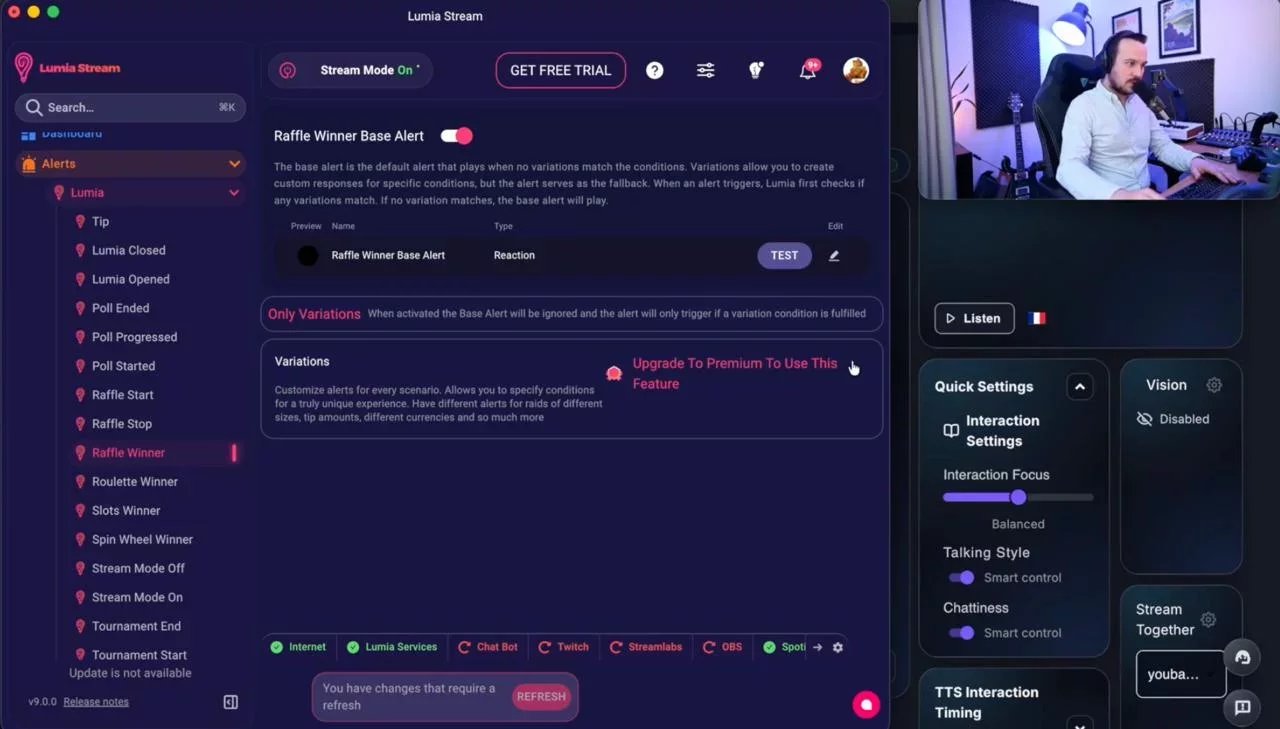
4. Set Up the Raffle Winner Alert in Lumia
Now it’s time to make ai_licia react when someone wins your raffle.
In Lumia:
- Go to Alerts.
- Select Lumia.
- Choose Raffle Winner.
- Click Edit Basic Alert.
- Go to Actions.
- Select ai_licia as the action source.
- Choose Trigger reaction in chat.
Then, add your instruction on what ai_licia should do:
Now, whenever your raffle ends and a winner is picked, ai_licia will jump into chat and announce it for you.
Want ai_licia to React When a Raffle Starts or Ends?
You can do that too.
The process is exactly the same. Instead of choosing the Raffle Winner alert, select either:
Raffle Start
or
Raffle End
Then follow the same steps to trigger an ai_licia reaction in chat.
This is a great way to build more hype around your raffles, keep your community engaged, and make every giveaway feel like a real stream moment.
Make Your Raffles Feel Like an Event
Raffles are already a fun way to reward your community. But with ai_licia and Lumia working together, they can become something your viewers actually remember.
While Lumia provides the infrastructure to run the Raffle, ai_licia is hyping up the start, celebrating the winner, or reacting when the raffle wraps up. Your stream gets an extra layer of personality without adding extra work for you.
Set it up once, let the magic happen, and give your community a raffle moment worth chatting about.