Engage Your Multilingual Community: The Language War Overlay is Here!

If you’ve ever streamed to a global audience, you know the vibe. You have viewers chatting in English, French, Spanish, or Japanese all at once. It’s a beautiful mix, but how do you actually use that diversity to drive engagement?
Enter Language War, the newest interactive overlay powered by ai_licia.
Whether you’re hosting a global watch party or just want to see which part of your community is the loudest, Language War turns every chat message into a point for a "national" team. It’s friendly competition, automated in real-time, and built to make your chat explode.
Configure your Language War Overlay here!
What is the Language War Overlay?
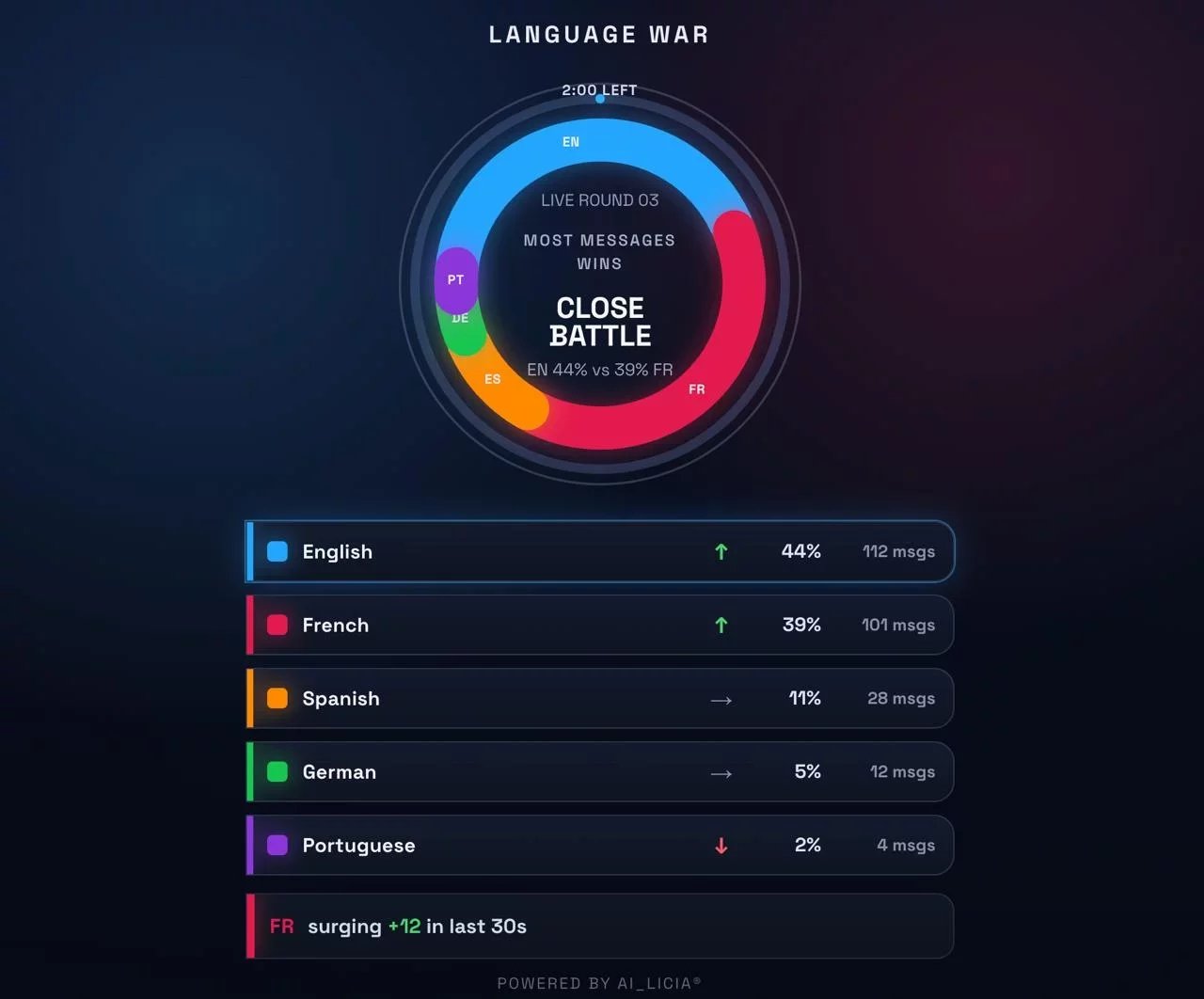
Language War is a real-time leaderboard that detects the languages being used in your chat (Twitch, YouTube, Kick, and TikTok) and ranks them against each other.
It’s not just a static list; it’s a timed battle. Rounds reset, percentages shift, and as one language starts to "surge," the overlay highlights the momentum. It turns your chat into a live game where the only way to win is to keep talking.
Why your stream needs it:
- +43% Chat Engagement: Data shows that gamifying chat participation leads to massive spikes in message frequency.
- Acknowledge your Global Fans: Show your international viewers that they aren't just "background noise", they are a core part of the "team."
- Cross-Platform Friendly: Just like our Combined Chat overlay, Language War merges data from all your connected platforms into one unified battle.
- Fully Automated: No !commands needed. ai_licia detects the language and updates the score instantly.
How it Works: The ai_licia Advantage
What makes this overlay different from a basic counter? ai_licia herself.
Because the overlay is synced with your ai_licia account, your AI co-host can actually see who is winning.
- Personalized Callouts: ai_licia can shout out the "Spanish Squad" for taking the lead.
- Hype the Comeback: When a language surges (e.g., "FR surging +12 in last 30s"), ai_licia can react to the momentum to keep the energy high.
- Round Winners: Celebrate the winning language at the end of every round with custom dialogue.
Set it up in 60 Seconds
We’ve made the configuration as simple as possible so you can get back to streaming:
- Connect ai_licia: Enter your API key and channel name.
- Pick Your Languages: Choose the specific languages you want to track or let it detect everything automatically.
- Style the Vibe: Adjust the colors to match your brand, choose between vertical or horizontal layouts, and set your round timers.
- Copy & Paste: Grab the browser source link and drop it into OBS/SLOBS or XSplit.
Ready to start the war?
The best communities are the ones that participate. Language War gives your viewers a reason to type, a reason to compete, and a reason to stay.
Launch the Language War Configurator and see which language takes over your next stream!
Have questions or want to show off your setup? Join our Discord community and share your clips!