The best Combined Chat overlay for your Stream

If you multistream, you already know the struggle: messages coming from Twitch, YouTube, Kick, or TikTok at the same time, conversations happening in parallel, and viewers sometimes feeling disconnected depending on where they are watching.
That’s exactly why we built the Combined Chat Overlay, a simple way to bring your communities together into one unified chat experience.
With ai_licia overlays, you can merge chats across platforms into a single, clean, customizable feed designed for OBS and other streaming tools.
If your goal is to make your stream feel more connected, more interactive, and easier to manage, this overlay is for you.
What is the Combined Chat Overlay?
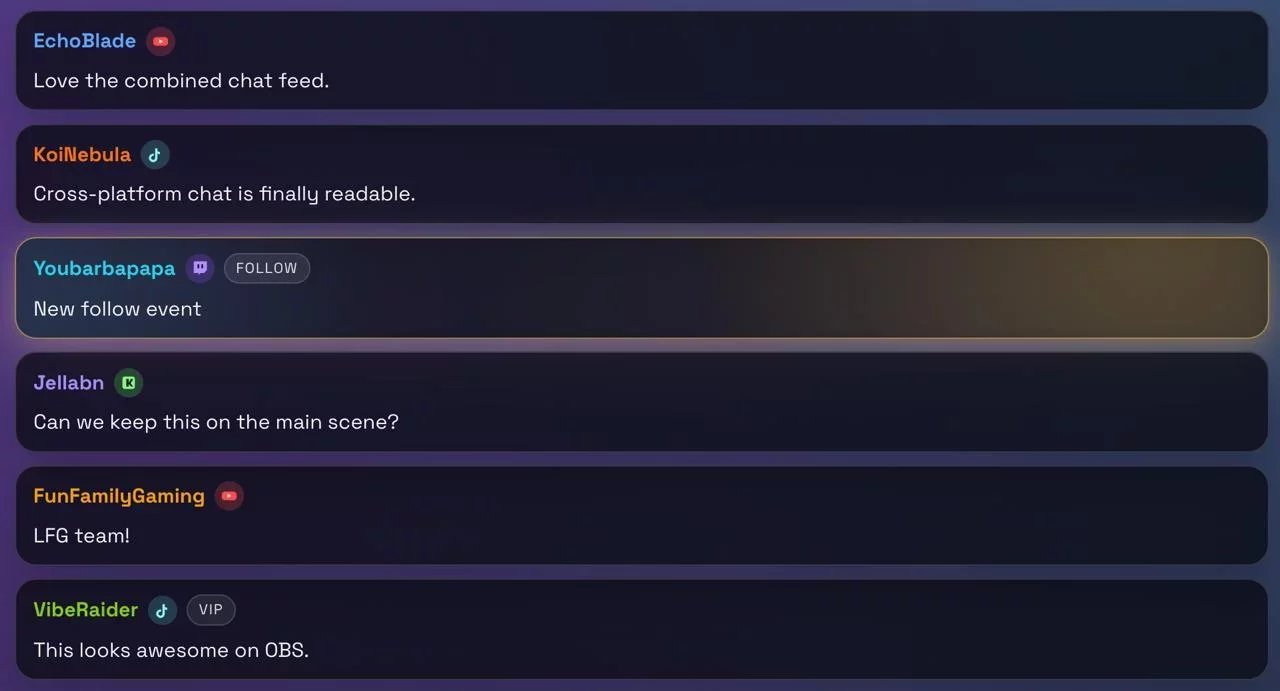
The Combined Chat Overlay (also called the Joint Chat Overlay) lets you display messages from multiple streaming platforms in one unified feed.
Instead of splitting your attention between different chat windows, you can:
- Display messages from multiple platforms in one place
- Show platform icons to identify where messages come from
- Include channel events like follows or subs
- Customize animations and appearance
- Filter events and message types
The result? A cleaner viewing experience and a stronger sense of community across platforms.
You can explore the overlay here:
👉 Combined Chat overlay
Overlays like these help turn viewers into active community members by increasing participation and interaction during streams.
Why use a combined chat overlay?
When you stream to multiple platforms, your audience is often split into separate conversations. A combined chat helps solve this by making everyone feel part of the same experience.
Some key benefits include:
🌍 Unite your community
Viewers from different platforms can see the full conversation happening during your stream.
⚡ Increase engagement
When viewers see active discussions, they are more likely to participate.
🎯 Reduce streamer workload
Instead of monitoring multiple chat windows, you can focus on one unified feed.
🎨 Professional presentation
The overlay is fully customizable so it matches your stream branding.
What can the overlay do?
Here are some of the features included in the Combined Chat Overlay:
Unified chat feed
- Combine Twitch, YouTube, Kick, and TikTok chat
- Display platform badges
- Show usernames with consistent colors
Customization options
- Animation timing controls
- Event filtering
- Profanity masking options
- Theme customization
ai_licia integration
- Display ai_licia events alongside chat
- Trigger interactions based on chat activity
- Sync with engagement tools
You can configure your own version here:
👉 Combined chat overlay configurator
How to set up the Combined Chat Overlay
Setting up the overlay only takes a few minutes.
Step 1 – Open the configurator
Start here:
https://overlays.getailicia.com/configure/joint-chat/
This is where you customize how your combined chat will look and behave.
Step 2 – Customize your overlay
Adjust settings like:
- Colors and theme
- Which platforms to include
- Event visibility
- Animation behavior
- Layout preferences
Make it match your stream style and branding.
Step 3 – Copy your overlay link
Once configured:
- Add your channel name and your ai_licia API Key (can be found in the ai_licia Dashboard on the My Account page)
- Generate your overlay browser source link
- Copy the URL provided
This link is what powers the overlay in your streaming software.
Step 4 – Add it to OBS
Inside OBS:
- Add a Browser Source
- Paste your overlay URL
- Adjust width and height
- Position it in your scene
Your combined chat will now appear live on stream.
ai_licia overlays are designed as ready-to-use browser sources specifically for tools like OBS or StreamLabs OBS.