Monetise chaos in your Stream with the ai_licia Twitch Extension

If you're looking for a Twitch extension that increases viewer interaction while helping you monetise your stream, the ai_licia Twitch Extension was built exactly for that.
With the ai_licia Twitch Extension, your community can trigger real actions during your stream using Twitch Bits, creating memorable moments while directly supporting your channel.
Whether you want small fun interactions or complete chaos, ai_licia lets you safely give control to your viewers while keeping full control over what is allowed.
Giving your viewers controlled ways to interact with your stream in exchange for Bits is a great way to make your content more immersive while also generating revenue. Not only does this create a new monetisation opportunity, but it also creates unique, unscripted moments that often turn into great highlights for you and your community.
That's exactly where the ai_licia Actions Twitch Extension comes in!
With this extension, you can define exactly what your viewers are allowed to control during your stream and let them trigger those actions for an amount of Bits that you decide.
You do need an ai_licia account to use the extension, but you do not need an active subscription to install or use it.
What Your Viewers Can Do
With the extension, your viewers can trigger actions such as:
- Switching your OBS scenes mid-stream 🎬
- Muting your microphone at the worst possible moment 🎤
- Triggering overlays or visual effects ✨
- Dropping your shields during a Star Citizen fight 🚀
- Turning off your lights in a horror game 👻
All of this happens directly from your Twitch stream.
You stay in control by deciding:
- Which actions are available
- How much they cost (Free to 10000 bits)
- How chaotic your stream becomes
How to Install the Extension
Make sure you have created an ai_licia account first. I would also recommend downloading the ai_licia Desktop App, as it is needed to trigger the actions from the extension.
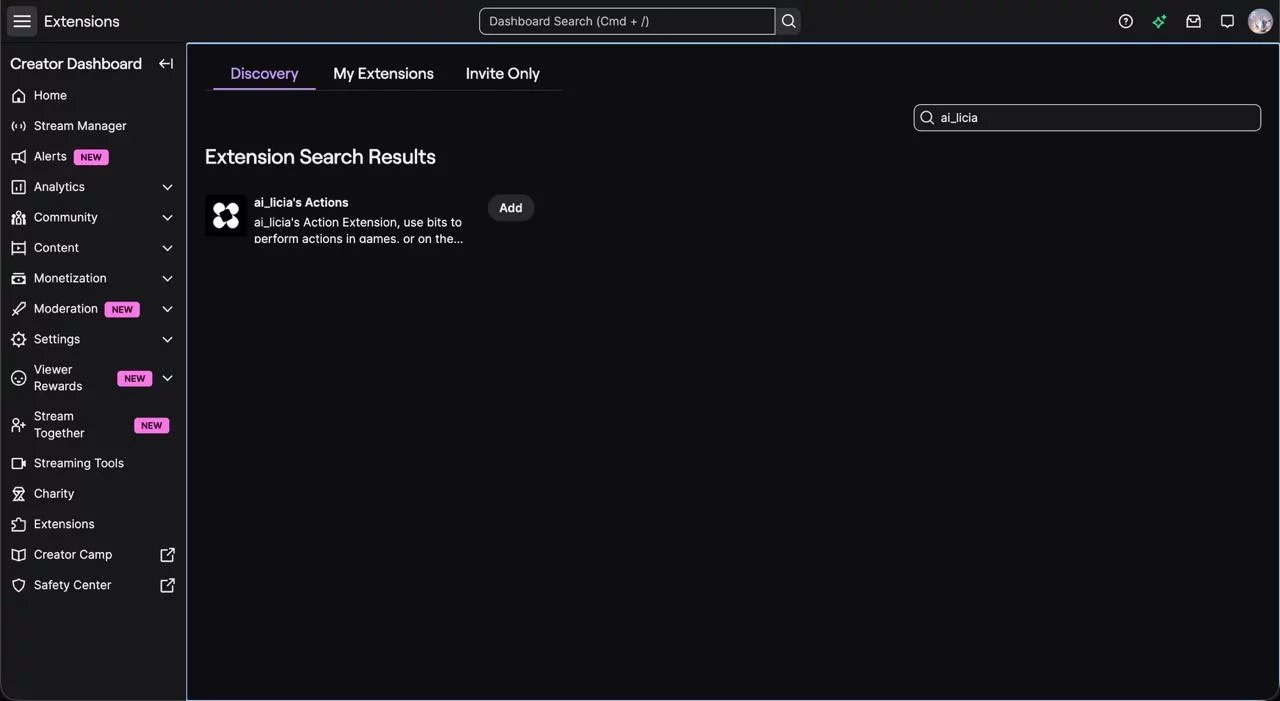
- Go to your Twitch Creator Dashboard
- Navigate to Extensions
- Search for ai_licia
- Locate the ai_licia Actions Extension
- Click the Install button on the extension card.
How to Configure the Extension
Once installed, the extension will automatically:
- Detect your currently active ai_licia Character
- Load the Actions configured for that Character
- Allow you to choose which Actions viewers can redeem
- Let you set the Bits price for each Action
If you create new Actions later, simply return to the Extension configuration and click Configure again to make them available to your viewers.
Creating Actions That Appeal to Your Viewers
This is where the real creativity begins.
The challenge is finding Actions that your viewers will love while keeping your stream playable… unless complete chaos is exactly what you're aiming for.
To help you get started, we have compiled ideas and ready-to-install Action bundles.
OBS-Related Actions
Viewers can:
- Change scenes
- Trigger overlays
- Control sound effects
- Capture clips
These create some of the most entertaining stream moments.
We also provide tutorials on how to build these types of Actions.
Twitch-Related Actions
Viewers can trigger platform features such as:
- Starting polls
- Launching predictions
- Starting raids
You can install the Twitch Producer bundle here:
https://www.getailicia.com/bundles/twitch-producer
Game-Specific Actions
This is where things get really interesting.
With Keystroke Actions, ai_licia can simulate almost any input, including combinations of keys, allowing viewers to directly impact your gameplay.
Some examples from the community include:
- Turning off a ship engine while landing in Star Citizen
- Retracting landing gear in Microsoft Flight Simulator
- Detaching a trailer mid-drive in Euro Truck Simulator 2
- Reloading your weapon during a clutch 1v1 in Counter-Strike 2
- Changing gear sets during a World of Warcraft dungeon
The only real limit is your imagination!
You can explore our Action Bundles and find already existing ones for your game to make the setup even faster.